
Explore key tools, smart features, and expert insights...
In today’s competitive landscape, moving to a cloud-native platform like ChromeOS is essential for security, agility, and cost efficiency. But attempting migration without proper planning exposes organizations to hidden costs, security vulnerabilities, high IT support expenses, and productivity disruptions.
The ChromeOS Readiness Tool provides more than a compatibility check, it delivers the strategic clarity needed to identify risks early, uncover savings, and ensure a smooth migration journey.
Unmanaged applications and legacy systems increase vulnerability to malware, data breaches, and compliance risks. The ChromeOS Readiness Tool addresses this proactively,
Secure Data Handling: Assessment data remains within your organization, protected by encryption, ensuring sensitive insights are only accessible to authorized personnel.
Browser Insights: The tool analyzes browser and extension usage to flag unauthorized or risky add-ons, helping IT teams reduce threats before the transition.
By exposing risks upfront, the ChromeOS Readiness Tool enables stronger security postures and reduces reliance on costly third-party solutions.
High IT support costs often come from aging hardware and post-deployment surprises. The ChromeOS Readiness Tool helps contain these costs by:
Device Readiness Statuses: Classifying devices as Ready to Switch, Ready with Verification, or Blocked, giving IT teams a clear upgrade roadmap.
Hardware Lifecycle Extension: Identifying opportunities to repurpose devices with ChromeOS Flex, reducing hardware replacement costs, cutting e-waste, and supporting sustainability initiatives.
This foresight transforms what could be major expenses into long-term savings.
Discovering an application or peripheral incompatibility mid-migration can stall operations. The ChromeOS Readiness Tool eliminates this risk by:
Identifying Blockers Early: Applications are categorized as ChromeOS Ready, Possibly Ready, Blockers,or Unknown ensuring no surprises during deployment.
Virtualization Recommendations: The tool highlights apps that need virtualization and suggests solutions like Cameyo, enabling continued access without disruption.
With blockers resolved in advance, organizations avoid downtime and maintain user productivity throughout the transition.
The ChromeOS Readiness Tool shifts IT planning from reactive problem-solving to proactive innovation. By delivering a clear view of your IT environment, it helps organizations:
Strengthen security posture
Reduce costs and extend device lifecycles
Maintain productivity and continuity
With ChromeOS Readiness Tool, migration becomes not just a technology switch, but a strategic step toward a secure, cost-efficient, and future-ready IT ecosystem.
Adopting ChromeOS is more than just a technical upgrade, it is a strategic move toward modernizing IT infrastructure. A successful migration depends on gaining deep, actionable insights into the existing environment, and the ChromeOS Readiness Tool provides exactly that.
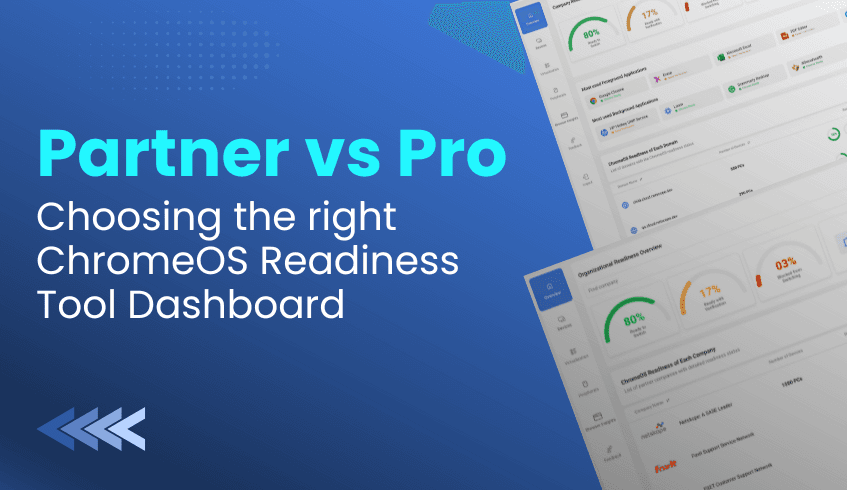
The ChromeOS Readiness Tool offers two distinct web dashboards, the Pro Dashboard and the Partner Dashboard. Each is designed for different users and deployment scenarios. Understanding how these dashboards differ is essential for choosing the right one and ensuring a secure, smooth transition.
Both dashboards deliver highly detailed compatibility assessments, but they serve different purposes. The Pro Dashboard is focused on a single organization, while the Partner Dashboard is designed for multi-client management.
The Pro Dashboard is tailored for internal IT teams and administrators managing one organization. It provides a clear, detailed view of readiness, including company-level insights, domain counts, device distribution, and application usage patterns.
Access depends on the deployment method:
With the Other Deployment Flow, the Pro Dashboard is included by default. This flow is optimized for Unified Endpoint Management (UEM) and cloud infrastructure.
With the Enterprise Flow, access is only possible if results are stored in Google Cloud Storage (GCP bucket). In this setup, the organization must create and manage its own storage bucket and grant the necessary permissions.
This structure ensures that Pro dashboard users maintain full ownership and control of their data while unlocking the depth of insight needed for internal migration planning.
The Partner Dashboard is built for certified partners and service providers who manage multiple customer companies. It offers a centralized view across client environments, making it possible to monitor progress, track readiness scores, and compare domains across different organizations.
Access requires stricter conditions:
For the Enterprise Flow, partners must use GCP Cloud Storage and be recognized as a Cloud Service Provider (CSP).
It is also accessible through the Other Deployement Flow when deployed with a service provider.
Partners can only unlock client data after entering the customer’s encryption file (private key). Depending on the setup, assessment results may be stored in a shared Partner GCP bucket or in a customer-managed bucket, giving flexibility in how data is secured and accessed.
Despite their differences, both dashboards share core features that make them indispensable tools for ChromeOS migration planning:
Comprehensive Readiness Overview: Each dashboard provides a snapshot of overall readiness, detailed breakdowns of compatibility statuses, and application usage trends.
Device and Peripheral Insights: Administrators can view device readiness, filter by categories, and analyze connected peripherals to ensure full compatibility with ChromeOS Flex.
Virtualization Planning: Both include a Virtualization section with Cameyo recommendations, helping identify which applications marked as “Blocker” or “Possibly Ready” can be virtualized.
Secure and Restricted Access: To maintain strict data privacy, access to readiness results always requires uploading the private key generated during deployment. This ensures only authorized users can view collected data.
The choice between the Pro and Partner dashboards depends entirely on the migration context:
Use the Pro Dashboard if you are an internal IT team focusing solely on your organization’s readiness. It offers precise, company-level insights and ensures full control over your assessment data.
Use the Partner Dashboard if you are a service provider or CSP managing readiness across multiple clients. It allows centralized oversight, secure client-by-client access, and flexible data management options.
By selecting the right dashboard, organizations and partners can unlock the full strategic value of the ChromeOS Readiness Tool, turning raw assessment data into actionable insights and enabling a secure, confident move toward a cloud-first IT strategy.
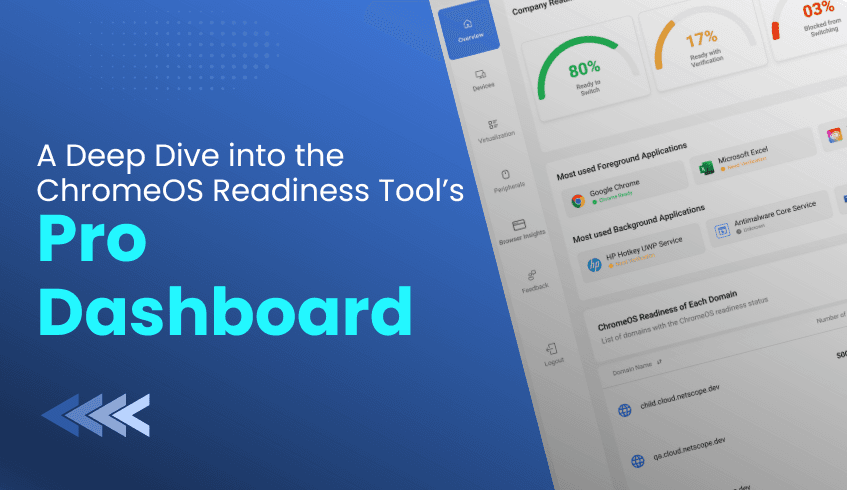
As organizations modernize their IT infrastructure and prepare to transition to ChromeOS, data-driven insights and centralized control become essential. For IT leaders managing a single organization, the Pro Dashboard of the ChromeOS Readiness Tool serves as the command center for assessing compatibility, monitoring readiness, and planning a smooth migration.
The Pro Dashboard is designed specifically for single organizations, giving IT administrators a clear and detailed view of their company’s readiness for ChromeOS adoption.
A strict security protocol protects access:
Administrators must sign in with a Google account.
The private key generated during tool deployment must be uploaded.
This ensures that only the deploying user with the corresponding private key can access the collected data, keeping readiness insights highly secure.
Dashboard access depends on the installation method and storage setup:
Other Deployement Flow – The Pro Dashboard is included by default with this flow, optimized for Unified Endpoint Management (UEM) and cloud-based infrastructure.
Enterprise Flow – Available only if results are stored in Google Cloud Storage (GCP bucket).
Independent Pro Users – Must set up and manage their own Google Cloud Storage bucket, granting the storage object admin role to the provided service account.
The Pro Dashboard transforms raw assessment data into actionable intelligence for IT leaders.
Administrators receive an instant snapshot of organizational readiness, including:
Current readiness statuses and percentages
Domain counts
Device distribution across the company
This high-level view helps prioritize actions and accelerate migration planning.
Granular visibility supports proactive decision-making:
Application Usage: Foreground and background apps are categorized by readiness.
Device Management: Device-level details include ChromeOS Flex readiness, overall status, and app readiness. Filters enable drill-down into specific devices or applications.
Domain Readiness: Readiness is broken down per domain, showing device counts and readiness percentages.
The Virtualization section identifies applications that may require alternative solutions:
Flags apps marked as “Possibly Ready” or “Blocker.”
Provides Cameyo recommendations for virtualization.
Offers filtering by usage (High/Low) and tooltips for compatibility clarity.
Specialized insights extend beyond applications and devices:
Peripheral Readiness: Displays detailed information such as device type, model, and readiness status.
Browser Insights: Provides usage data, browser versions, and extension details, helping IT mitigate risks from unauthorized or non-compliant extensions.
The Pro Dashboard is more than an assessment tool, it is a strategic enabler for IT modernization. By combining secure access, comprehensive reporting, and virtualization guidance, it allows organizations to:
Optimize existing IT investments
Extend device lifecycles with ChromeOS Flex
Strengthen compliance and security
Execute a confident, cloud-first migration strategy
When readiness clarity matters most, the Pro Dashboard delivers the visibility, precision, and control required for a seamless transition to ChromeOS.
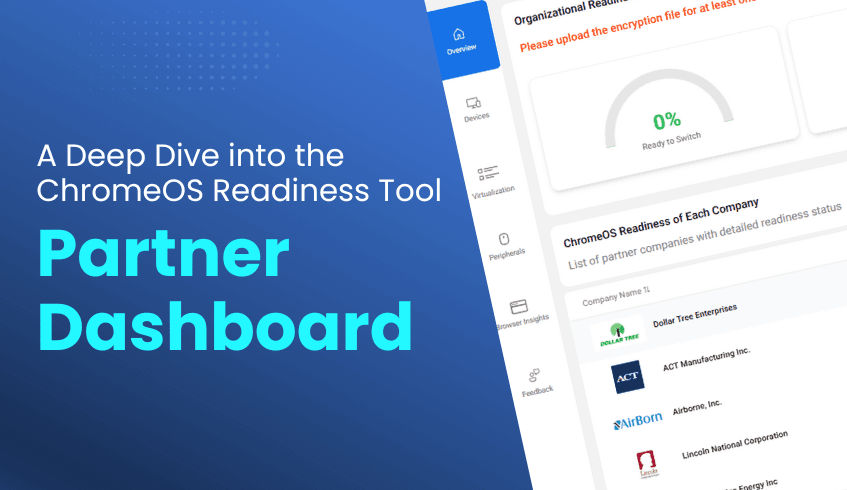
For service providers and certified partners navigating the complex landscape of client IT migration, visibility and control are essential. The ChromeOS Readiness Tool Partner Dashboard acts as a centralized command center, designed to help partners efficiently monitor readiness assessments, provide detailed migration insights, and deliver strategic guidance to clients transitioning to ChromeOS.
The Partner Dashboard is a dedicated web interface that serves as a powerful tool for managing readiness assessments across multiple customer companies.
It is primarily used by certified partners or service providers who assist organizations in transitioning to ChromeOS. To access this specialized tool, partners must first receive entry to the Partner Portal using the email address provided in their application. Successful completion of the mandatory training modules within the portal is required to become a ChromeOS Readiness Tool certified partner and receive official certification.
Access to the Partner Dashboard depends on the customer’s deployment method and is secured via encryption.
Deployment Flow: The dashboard is available to partners when the ChromeOS Readiness Tool is installed using the Other Deployement Flow (optimized for UEM systems) with a service provider. In the Enterprise Flow (for environments using Active Directory/GPOs), assessment results must be stored in the GCP Cloud (Storage Bucket), and the partner must be a CSP (Cloud Service Provider). If a customer chooses Enterprise Flow but stores data only in a Network Shared Folder (on-premise), their data will not display on the Partner Dashboard.
Access Security: To view detailed readiness data for a customer company, the partner must enter the customer's encryption file (the private key generated during deployment). Partners are also required to use a partner-specific setup file when deploying the tool, as only data generated with this file will appear on the dashboard.
The Partner Dashboard provides a clear and detailed view of migration readiness across an entire portfolio of clients.
Partners can efficiently manage multiple customer companies by entering their encryption keys. Using drop-down menus, they can select a company and domain to view all devices under that domain.
Once the customer's encryption key or the private key is entered, partners unlock detailed readiness data, including:
Company Readiness Overview: Overall statuses, percentages, total company count, and device distribution.
Device Readiness: Core readiness status, device counts, readiness percentages, and data on Chrome Ready applications and peripherals.
Device Management: Select domains to view each device’s ChromeOS Flex readiness and overall status. Application readiness is displayed with counts and statuses, and devices can be filtered by readiness status.
Peripheral Assessment: Core readiness status is presented as percentages, including a graph comparing device and peripheral distribution. Detailed information, such as device names, category, model, and readiness status, is available via “view more” on the web dashboard.
The Partner Dashboard centralizes complex migration data from multiple clients into one interface, making it an essential tool for data-driven migration planning.
By leveraging the Partner Dashboard, service providers gain unparalleled insight into client environments, enabling them to offer expert recommendations, streamline transitions, and ensure cost-efficient, secure ChromeOS deployments. Partners can also share experiences, submit feedback, and safely log out once work is complete.
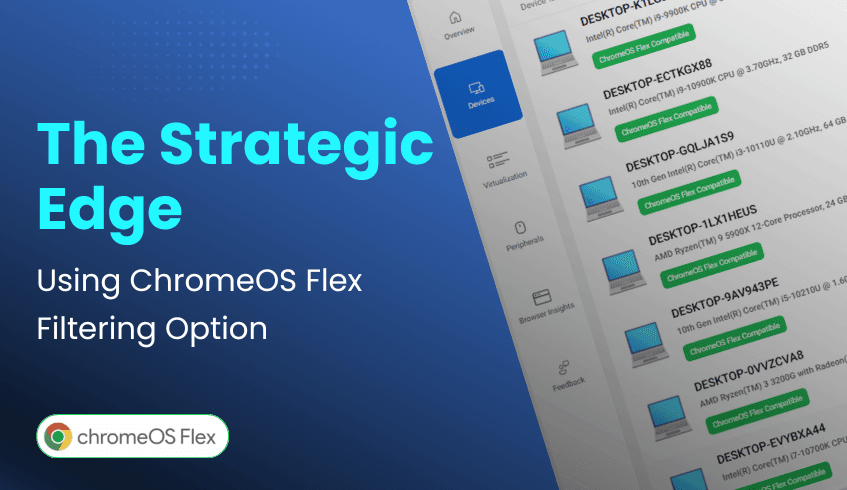
For IT leaders driving digital transformation, the challenge isn’t just adopting new technology, it’s modernizing infrastructure in a way that’s efficient and cost-effective. ChromeOS, combined with the ChromeOS Readiness Tool, provides the intelligence to achieve both. A standout feature within the ChromeOS Readiness Tool dashboard is ChromeOS Flex filtering, which gives organizations a strategic advantage in optimizing hardware investments.
ChromeOS Flex is designed to revitalize existing PCs and Macs, extending the life of legacy devices without the need for costly replacements. This approach not only helps organizations meet financial goals but also supports sustainability by reducing e-waste.
The ChromeOS Readiness Tool’s web-based dashboard serves as the command center for device assessments. Within the Devices section, IT teams can view the readiness status of every system, identifying which are compatible with ChromeOS or ChromeOS Flex. This quick snapshot helps leaders understand exactly where each device stands in the migration process.
The real power lies in the dashboard’s filtering feature, which allows teams to isolate devices compatible with ChromeOS Flex. This enables IT leaders to:
Identify opportunities: Pinpoint older machines that can be upgraded with Flex.
Plan deployments: Build targeted groups for Flex migration to minimize disruption.
Control costs: Extend the lifespan of current assets instead of investing in new hardware.
By focusing on Flex-ready devices, organizations can modernize more strategically, balancing performance, cost efficiency, and sustainability.
The ChromeOS Readiness Tool doesn’t just assess, it empowers. With ChromeOS Flex filtering, IT teams gain the clarity needed to maximize existing hardware, cut costs, and move toward a modern, cloud-first infrastructure with confidence.

In today’s enterprise landscape, IT leaders are under pressure to modernize while balancing security, cost, and employee experience. Many are making the strategic shift from traditional Windows environments to ChromeOS, a cloud-first platform built for agility and scale. But making such a move successfully requires more than just intent, it demands clear, data-driven insights. That’s where the ChromeOS Readiness Tool becomes indispensable.
ChromeOS is a game-changer, offering leaders a clear path to modernize and optimize IT operations:
Cost & Sustainability: Extends hardware life with ChromeOS Flex, reduces e-waste and hardware costs, and consumes less energy than comparable devices.
Robust Security: Multi-layered defenses like sandboxing, verified boot, and automatic updates minimize cyber threats and simplify IT security management.
Cloud-Native Collaboration: Seamless integration with Google Workspace enables real-time, anywhere access, essential for hybrid and distributed teams.
Agile Management & Scalability: Zero-touch enrollment and centralized cloud management make large-scale deployments faster, with lower administrative overhead.
The ChromeOS Readiness Tool is a comprehensive compatibility assessment platform that evaluates your IT environment’s readiness for ChromeOS. It transforms uncertainty into clarity by providing the insights IT leaders need to plan with confidence.
Here’s how it helps IT teams succeed:
Granular Compatibility Data: Assesses Windows applications, classifying them as ChromeOS-ready, Possibly Ready, Blockers, or Unknown. Devices are categorized as Ready to Switch, Ready with Verification, or Blocked from Switching. This provides a clear roadmap and highlights potential challenges early.
Insightful Usage Analytics: The Browser Insights feature offers a detailed view of browser and extension usage, versions, and activity across the organization. This allows IT to manage risky extensions, streamline browser use, and better align with ChromeOS and Chrome Enterprise Browser. Foreground and background application data reflect actual usage patterns for more accurate readiness planning.
Actionable Dashboards & Virtualization Solutions: Intuitive dashboards (including Pro and Partner views) deliver readiness scores, device and peripheral assessments, and virtualization recommendations via Cameyo for applications that are not immediately compatible.
Data Security by Design: All collected data stays within the organization, safeguarded by encryption protocols. Access to readiness dashboards requires a private key, ensuring that only authorized users can view sensitive details.
Armed with insights from the ChromeOS Readiness Tool, IT leaders can:
Streamline Migration: Minimize downtime, eliminate guesswork, and save resources.
Plan Proactively: Anticipate challenges before they occur and focus on forward-looking innovation.
Guide with Clarity: Deliver smoother, expert-led migrations that support business goals.
IT leaders are winning with ChromeOS because they make informed, insight-driven decisions. The ChromeOS Readiness Tool transforms complex compatibility and usage data into clear strategies, empowering organizations to embrace ChromeOS with its insights. The result is a smarter, more secure, and future-ready IT ecosystem that redefines what modernization looks like.
In today’s business landscape, environmental responsibility is no longer optional; it’s essential. Organizations are seeking IT solutions that not only deliver efficiency and security but also reduce their ecological footprint. ChromeOS, Google’s cloud-native operating system, stands out as a platform designed for eco-conscious digital transformation. And to ensure organizations transition smoothly, the ChromeOS Readiness Tool provides the insights and clarity needed to make sustainability a practical reality.
While ChromeOS sets the foundation for sustainable IT, the ChromeOS Readiness Tool ensures organizations achieve this vision strategically. By assessing applications, devices, and peripherals, the tool provides actionable insights that drive greener decisions.
Optimizing Existing Resources: The tool categorizes applications as ChromeOS-ready, Possibly Ready, Blockers, or Unknown, and devices as Ready to Switch, Ready with Verification, or Blocked from Switching. This helps IT teams identify hardware suitable for ChromeOS Flex, reducing unnecessary purchases.
Minimizing E-Waste: By pinpointing devices that can be reused instead of replaced, the tool empowers organizations to extend hardware lifespans and significantly cut down electronic waste.
Driving Cost & Time Efficiency: Early visibility into potential challenges saves resources and ensures smoother migration. Efficient planning avoids wasteful spending, aligning IT transformation with broader sustainability goals.
ChromeOS is more than an operating system, it’s a catalyst for sustainable digital transformation. From extending device life to reducing energy use, it offers organizations a clear path toward greener IT practices. The ChromeOS Readiness Tool strengthens this journey by providing the insights abd clarity needed to reuse resources, reduce e-waste, and migrate with confidence.
By combining ChromeOS with the ChromeOS Readiness Tool, businesses can modernize their IT while making a meaningful contribution to environmental responsibility, delivering a future that is both digital and sustainable.
If you are ready to align your IT with sustainability goals, explore the ChromeOS Readiness Tool today and take the first step toward an eco-friendly digital transformation.
In today’s fast-paced digital world, educational institutions and enterprises need IT solutions that are efficient, secure, cost-effective, and adaptable. Google ChromeOS is emerging as a leading operating system built for the cloud, offering agility, strong security, and simplified management. For organizations looking to modernize their digital infrastructure, ChromeOS provides a future-ready foundation.
Cost-Effective Modernization and Sustainability With ChromeOS Flex, organizations can extend the life of existing PCs and Macs, reducing e-waste and hardware costs. ChromeOS devices also consume less energy than comparable devices and receive automatic updates, supporting both financial and environmental goals.
Security by Design ChromeOS employs multi-layered defenses such as sandboxing, verified boot, and automatic updates. This reduces exposure to malware and cyber threats while minimizing reliance on third-party security tools, streamlining IT management.
Cloud-First Collaboration ChromeOS integrates deeply with Google Workspace, enabling seamless communication and real-time collaboration through Gmail, Google Meet, Google Chat, and other productivity apps. This is essential for remote and hybrid learning and working environments.
Rapid Deployment and Simplified Management With zero-touch enrollment and centralized cloud-based management, IT teams can deploy ChromeOS devices at scale quickly and efficiently. Its user-friendly interface reduces onboarding time for both students and employees.
Scalability for Growth Whether expanding classrooms or global operations, ChromeOS supports large-scale provisioning and consistent policy enforcement. Integration with cloud services and Virtual Desktop Infrastructures (VDIs) ensures scalability without being tied down by legacy systems.
Adopting ChromeOS may seem complex, but the ChromeOS Readiness Tool simplifies the process by offering a clear, data-driven migration roadmap. It evaluates applications, devices, and peripherals to ensure compatibility and provides actionable insights for IT teams.
Comprehensive Compatibility Assessment The tool classifies Windows applications as ChromeOS-ready, Possibly ready, or Blockers, while devices are categorized as Ready to Switch, Ready with Verification, or Blocked from Switching. This clarity eliminates guesswork and helps IT leaders prioritize actions for smoother transitions.
Secure Data Handling Sensitive information stays within the organization and is protected with encryption protocols, ensuring only authorized personnel have access. This builds trust while supporting strict data privacy requirements.
Flexible Deployment The tool offers multiple deployment options to fit different infrastructures:
Enterprise Installation: for Active Directory and GPO-based environments.
Other Deployment Installation: for cloud-first setups and Unified Endpoint Management (UEM) systems.
Strategic Recommendations & Virtualization For applications that cannot run natively, the tool identifies virtualization needs and recommends solutions like Cameyo to maintain continuity. This ensures organizations can transition without losing access to critical tools.
Browser Insights for Secure Management The Browser Insights feature provides visibility into browser and extension usage, including version distribution and risky extensions. This allows IT teams to enforce policies, reduce vulnerabilities, and strengthen security compliance.
ChromeOS is a powerful solution for both education and enterprise, combining security, cost savings, scalability, and cloud-native design. The ChromeOS Readiness Tool removes uncertainty from migration by offering clear compatibility assessments, strong data protections, and actionable insights. Together, they enable organizations to adopt ChromeOS with confidence, unlocking innovation, efficiency, and long-term sustainability.
Moving from Windows to ChromeOS is more than just an operating system switch, it’s a fresh, modern way of working. For businesses, this transition represents not only a step into the cloud-first future but also a chance to simplify IT, strengthen security, and cut costs. With the ChromeOS Readiness Tool, organizations can transform what might seem like a daunting migration into a smooth, insightful, and even exciting experience.
The ChromeOS Readiness Tool provides a structured path for migration, removing guesswork and giving IT teams clarity every step of the way.
Clear Compatibility Insights The tool analyzes applications and devices, classifying them into readiness categories:
Apps: ChromeOS-ready, Possibly ready, Blockers or Unknown
Devices: Ready to Switch, Ready with Verification, or Blocked from Switching
This ensures IT leaders know exactly where they stand before moving forward with ChromeOS.
Handling Blockers with Smart Solutions For apps that don’t work natively, the tool recommends virtualization options, such as Cameyo, to keep critical workflows running smoothly during and after migration.
Flexible Deployment Options
Enterprise Flow: Designed for Active Directory and on-premise infrastructures with automated agent deployment.
Other Deployment Flow: Built for cloud-based environments and Unified Endpoint Management (UEM) systems, with manual setup flexibility.
Strong Data Security All assessment data stays within the organization and is encrypted with protocols. Only authorized personnel with a private key can view results, ensuring privacy and control.
Actionable Dashboards & Reports An intuitive web dashboard provides readiness scores, real-time device assessments, and detailed Browser Insights for managing browser versions and extensions. IT teams can also export raw data for deeper analysis in tools like Looker, Tableau, or Power BI.
Switching from Windows to ChromeOS offers more than technical gains, it brings valuable lessons for IT leaders:
Lesson 1: Assess Before You Move. Guesswork is costly. Detailed compatibility insights help avoid surprises.
Lesson 2: Security Should Be Native. With built-in protections and strict access controls, ChromeOS simplifies security.
Lesson 3: One Size Doesn’t Fit All. Flexible deployment flows ensure migration adapts to your infrastructure.
Lesson 4: Data Becomes Your Roadmap. Actionable insights guide efficiency and cost savings by flagging blockers early.
Lesson 5: The Future is Cloud-First. Migration is not the end, it’s the start of ongoing adaptability and innovation.
Migrating from Windows to ChromeOS is not just a practical IT decision, it’s a bold, exciting step toward a simpler, more secure, and future-ready enterprise. With the ChromeOS Readiness Tool, organizations gain the clarity, confidence, and strategy to make the move successfully. Leaving behind legacy systems has never been smarter.